


If supplier follow-up depends on buyer memory, your open order process is not scalable. That is not a criticism of buyers. It means the business has never converted supplier follow-up into a defined process, so it runs on whatever each person happens to do.
The pattern is familiar. One buyer keeps a spreadsheet pulled from the ERP. Another works from inbox flags. A third calls suppliers. A fourth chases an order only when production asks for a date. Managers receive fragmented updates, and escalation depends on who happens to notice a problem first. Every buyer is doing their best; the process itself is the weak point.
ChainLink SRM Chase Automation replaces those personal habits with a managed workflow for open purchase orders. The idea is straightforward: it turns supplier follow-up from an individual buyer habit into a managed business process. This article explains what Chase Automation does, what it replaces, how the workflow runs from ERP data through response and escalation, and where it fits — building on the broader case for purchase order management software that goes beyond the issued PO.
Buyers spend their days answering a small, predictable set of questions about open purchase orders: Has this PO been acknowledged? Is the promise date still valid? When will it ship? Is there a delay? Has the committed quantity changed? Does the supplier need clarification? Is the current commitment still enough for production or the customer?
These are necessary questions. The problem is not that the work lacks value; it is that repeatedly asking, recording, checking, and escalating the answers is usually handled by hand. When it is, the consequences compound: skilled buyers spend hours on repeatable communication, cadence varies from person to person, replies stay trapped in individual inboxes, changed commitments are not surfaced consistently, managers lack a common view, and escalation happens late or informally. That model gets harder to hold together as PO volume grows.
Picture a buyer responsible for a few thousand open PO lines: no one can reliably remember which line needs a second nudge, which supplier went quiet, or which promise date quietly moved. ChainLink built Chase Automation to separate the routine status requests a rule can handle from the judgment, negotiation, and supplier management that only a person can.
Chase Automation is not simply replacing email. It replaces the collection of manual habits that supplier follow-up tends to rely on.
Manual emails. Buyers rewrite similar requests all day, cadence bends to workload, replies are not always tied to the right order, and important changes stay buried in threads. Email can remain one channel for suppliers; what changes is that the process is no longer run by hand from an inbox.
Spreadsheet reminders. Spreadsheets can track work for a while, but they require manual updates, duplicate ERP data, drift out of sync across a team, and offer little workflow control. They are not inherently bad — they become unsuitable as volume and complexity rise.
Buyer memory. Experience matters, but memory should not be the control mechanism. Routine follow-up should happen because a rule requires it, not because someone remembered — and critical knowledge should stay visible when a buyer is out, reassigned, or leaves.
One-off supplier calls. Calls are essential for real issues, but routine calls do not scale and verbal commitments are captured inconsistently. Reserve them for situations that need context, negotiation, or recovery.
Shared inbox management. A shared inbox centralizes messages but does not create workflow. Ownership can stay unclear, responses can still be missed, and an inbox does not know which order changed or who should act.
Informal escalation. Escalation that depends on urgency or personal relationships is fragile. Human discretion still matters, but important exceptions should follow defined routing within a visible process.
Chase Automation replaces fragmented process management, not buyer relationships. For the broader framework behind this shift — what supplier follow-up automation should do, and why buyers should manage exceptions — see how purchase order management software eliminates manual supplier chasing.
ChainLink SRM Chase Automation uses open purchase order data, follow-up rules, structured supplier requests, response capture, and exception workflows to help procurement teams manage follow-up consistently. ChainLink does not replace the ERP; it uses open order data to drive supplier follow-up and procurement action.
Open PO data flows into ChainLink through a process your team defines and controls; the ERP stays the system of record. That data may include the PO number, line, supplier, requested and promise dates, quantity, and status, though the exact integration method and field ownership should be confirmed during evaluation. This matters because follow-up is tied to current order data and the whole team works from a common source rather than a personal export.
Procurement teams define when a supplier update is required. Depending on configuration, rules can consider order age, acknowledgment status, requested and promise dates, time until the due date, supplier, business unit, material priority, risk, or a lack of response. Configurable rules turn follow-up from personal habit into company policy — though the organization still has to decide which rules make sense for its business.
When a rule triggers, ChainLink sends the supplier a structured request tied to the specific order or line, so the supplier knows exactly what information is needed. Different situations call for different questions, which may ask for acknowledgment, a promise date, a shipment date, a quantity, current status, a delay reason, or a comment — consistenteach time rather than freshly written.
Sending the request is only the beginning. The supplier’s response must become part of the workflow. ChainLinkassociates responses with the correct purchase order or line and captures them in structured fields that make them usable, while still allowing comments and context, so buyers do not have to search inboxes to learn whether a supplier replied. Response capture is as important as request automation: a supplier update only becomes useful when it is tied to the correct order and evaluated against the current commitment.
The workflow makes conditions visible without a buyer hunting for them: a missing acknowledgment, an overdue response, a changed promise date, a reduced quantity, a late or stale status, and other configured risk conditions. Non-response should become visible without requiring a buyer to search for it. Software can surface a condition, but buyers and managers still interpret its business impact — the system does not automatically know every form of risk.
Different exceptions need different owners. Some stay with the buyer; others involve a manager, or planning, operations, quality, engineering, or supplier leadership. Escalation follows defined responsibilities and should make clear what changed, why it matters, who owns the next action, when it is due, and whether it remains unresolved. Not every escalation can be fully automated, but the routing and the record can be.
Compared with buyer-by-buyer follow-up, a managed process is stronger in specific, practical ways.
Consistent cadence. Defined rules apply follow-up the same way whether or not a buyer is busy, and different order types can still run on different schedules.
Better audit trail. Requests, responses, changes, and escalations are captured, so managers can see what happened without reconstructing email history.
More scalable process. Because requests are triggered by rules rather than initiated by hand, the process can absorb growing order volume and expand across teams, suppliers, and business units.
Less buyer effort. Buyers spend less time preparing routine reminders and searching for responses, and more time on orders that need action — better use of buyer time, not automatic headcount reduction.
Clearer supplier accountability. Suppliers receive defined requests, and commitments, changes, and missed response windows can be identified from the process record rather than from recollection.
Manager-level visibility. Managers can see patterns across buyers, suppliers, and orders and spot where follow-up is breaking down, without inspecting individual inboxes or spreadsheets.
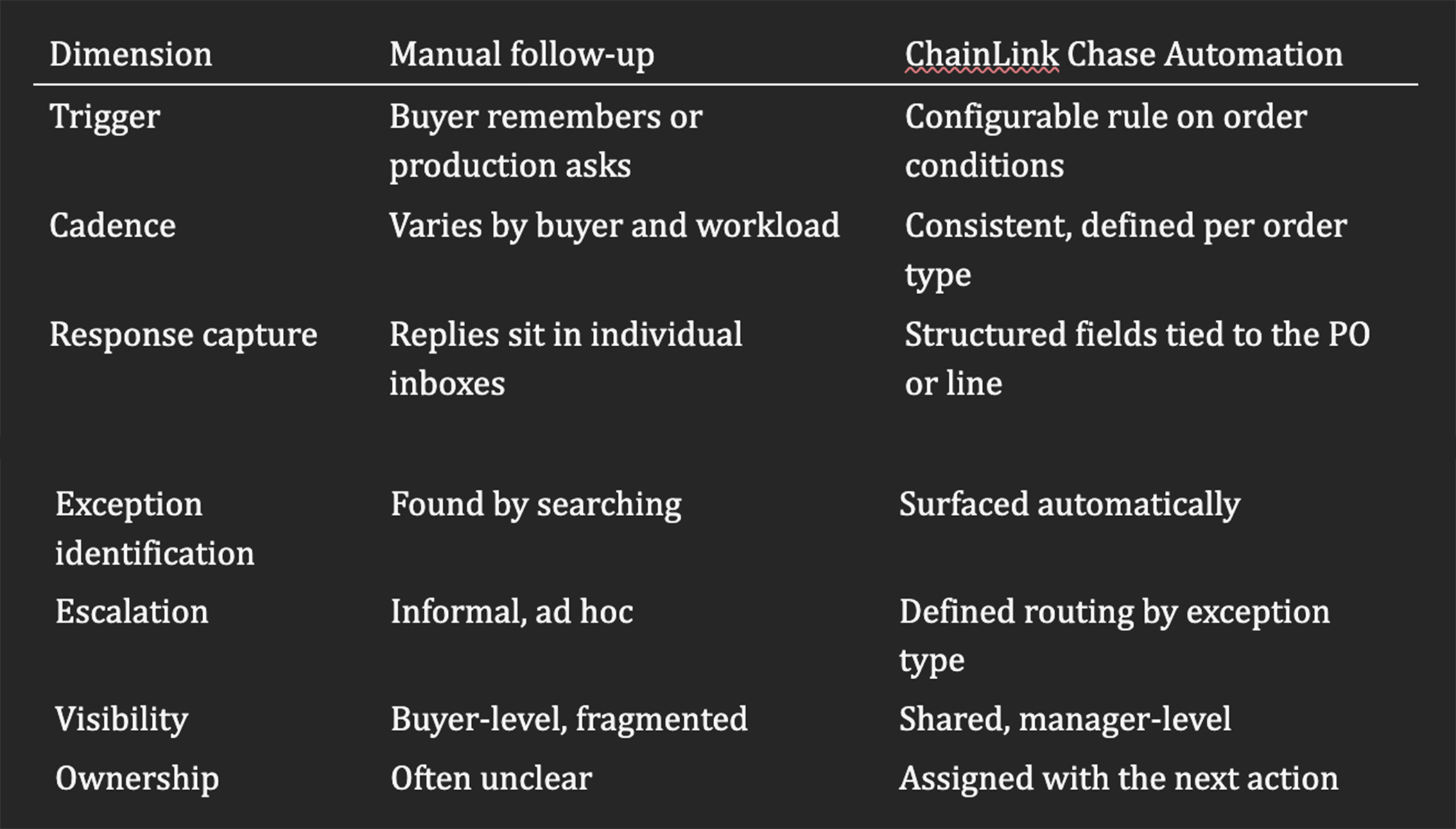
Working by exception means buyers do not give every open purchase order the same attention. They begin with the orders that are late, stale, unconfirmed, changed, non-responsive, or otherwise at risk. At scale, reviewing every order equally by hand is not practical, so the question becomes which orders actually need a person.
The buyer’s day changes as a result. Instead of asking which suppliers to contact, which emails never got a reply, and which dates changed, the buyer opens a prioritized queue: unacknowledged orders, missing responses, changed promise dates, late orders, reduced quantities, stale updates, and escalated issues. From there, the buyer does what only a person can — interpret the exception, assess business impact, contact the supplier when a real conversation is needed, coordinate recovery, and make tradeoffs.
Managers work differently too. They see systemic issues rather than one-off fires, review unresolved exceptions, identify supplier patterns, balance workload, and refine the rules and escalation paths over time. ChainLink does not remove the buyer from the process. It directs buyer attention to the part of the process that needs judgment.
The strongest fit is generally where manual follow-up has become hard to run consistently.
High open order volume. Large numbers of open orders or lines create repetitive follow-up, make manual tracking hard to maintain, and force teams to prioritize exceptions. There is no fixed PO threshold; the tell is that the manual model is straining.
Complex direct-materials procurement. Direct materials affect production, customer commitments, and inventory planning, so a delivery change has downstream consequences and buyers need structured, current supplier commitments.
Aerospace and defense suppliers. Long lead times, complex supplier networks, critical parts, documentation requirements, and frequent cross-functional coordination raise the cost of a missed or undocumented commitment — making a clear record of what each supplier said, and when, especially valuable.
Engineer-to-order and build-to-order manufacturers. In these engineer-to-build environments, orders change during execution and promise dates need repeated confirmation, so procurement has to coordinate closely with planning, operations, and suppliers.
Companies with frequent promise-date changes. The problem is not only lateness; repeated date changes create planning instability, so the organization needs visibility into both the current and prior commitment.
Teams relying on email and spreadsheets. These tools can work at lower scale but get harder to govern as volume grows. The need is strongest when managers cannot answer basic open-order questions without assembling information by hand.
A few signs Chase Automation may be worth evaluating:
If several of these describe your team, ChainLink’s open order management is worth a closer look.
Chase Automation is a process-enablement tool, not a substitute for procurement discipline. It still depends on clean, usable ERP data, clear follow-up policies, defined supplier expectations, sensible cadence rules, escalation ownership, user adoption, integration planning, and management follow-through.
A sound implementation answers a few practical questions up front: Which orders enter the process? Which suppliers participate? Which fields are required? What counts as an exception, and who owns each type? Deciding these deliberately is what turns the software into a reliable process rather than another tool people route around.
Manual supplier follow-up depends on individual buyer habits, and that model becomes hard to scale as volume grows. ChainLink SRM Chase Automation applies configurable rules, captures supplier responses, identifies exceptions, and supports escalation — while buyers keep responsibility for judgment, relationships, and recovery, and managers gain visibility into the process instead of relying on personal inboxes and spreadsheets. That changes supplier follow-up from a collection of individual actions into a managed business process.
The goal is not simply to send more reminders. It is to create a consistent process for knowing which suppliers responded, what changed, which orders are at risk, and who needs to act next.
Schedule a demonstration of ChainLink SRM Chase Automation to see how your team could manage open purchase order follow-up through configurable rules, structured supplier responses, and exception-driven workflows. Talk with an SRM expert to walk through it against your ERP and your open order portfolio.
David is the Chief Operations Officer and Director of Business Development at TTP Solutions LLC. Since 2019, David has been the driving force behind sales, marketing, and organizational development. David holds a B.B.A. in Entrepreneurship and a B.A. in Spanish from Middle Tennessee State University. He has a passion for helping others to solve problems creatively. Husband to KerrieAnn, David loves photography, hiking, traveling, and reading.