


It’s 7:58 on a Tuesday morning. A buyer opens last week’s open-order spreadsheet, scrolls to the part that was comfortably “on track,” and finds the line glowing red: promised for the 3rd, still not shipped, and the supplier’s most recent email reads, in full, “Thanks — noted.” Production needs it Thursday. Somewhere between PO release and the receiving dock, that order quietly stopped being managed — and no one noticed until it was a problem.
That gap — not PO creation — is the real job. Purchase order management software manages what happens after a PO is issued: it connects ERP order data with supplier acknowledgment, structured status updates, automated follow-up, and exception detection, then routes the orders that actually need a decision to a buyer. Storing PO data and executing open orders are two different jobs — and only one of them protects your delivery dates.
Because a purchase order may be issued, but it has not taken a vow of silence. The right software is what makes sure someone is listening.
An open purchase order is not a static record. It’s a live commitment with moving parts: requested versus confirmed dates, quantities, shipment plans, supplier conditions, and the occasional “small delay” that turns into a stopped line. Treat it as a row in a file and it will behave like one — sitting quietly until it becomes a problem.
Most teams already have data; what they lack is a process around it. Picture the Monday ritual: a buyer pulls the export, filters it, fires off fifteen follow-up emails, and by Thursday can’t remember which four suppliers never wrote back. An ERP export tells you what was true when you pulled it — it does not chase a supplier, confirm a date, or escalate when an answer never comes. Email and spreadsheets fragment the rest: ownership lives in one inbox, history in a notes tab, and the institutional memory in whoever hasn’t taken vacation. The spreadsheet is rarely the problem by itself; the problem is asking one file to serve as database, inbox, task manager, escalation engine, and institutional memory — usually under a name like FINAL_Open_PO_Report_v7_REALFINAL.xlsx.
To be clear, this isn’t an indictment of your ERP. The ERP is, and should remain, the system of record — it owns the authoritative order, the financials, and the master data. Many ERPs also offer collaboration modules. The practical gap most teams hit is one of execution and adoption: a daily operating layer that structures confirmation, follow-up, escalation, approval, and visibility around the record, in a way buyers and suppliers will actually use. Purchase order management software earns its keep when it closes that operating gap rather than adding one more place to type things.
It helps to name the work. The following five jobs are a practical ChainLink framework, not an industry standard — but they map cleanly to how post-issuance execution actually happens.
Start from authoritative order data, not a re-keyed copy. Good purchase order management software begins with your real open orders and preserves the context that makes them actionable: order and line, supplier, quantity, due date, buyer, and status. The goal is to replace the static, manually filtered export — not to spin up a parallel record that immediately drifts out of sync. Integration depth varies by tool and environment, so the honest question to ask any vendor is how open orders arrive and how current they stay, rather than assuming universal real-time, two-way sync.
This is the job most “tracking” tools skip. Confirming a PO means asking a specific question: do you accept this commitment as requested, or propose a change? ERP documentation treats a purchase order acknowledgment as the supplier’s confirmation to deliver specified quantities, at a specified price, on a specified date — with the option to accept, propose changes, or reject. That covers requested versus confirmed (promise) dates, quantities, and shipment readiness, including an advanced shipping notice (ASN) where applicable. Worth saying plainly: a cheerful “Got it!” that never names a date is a pleasantry, not a commitment. “Message received” is not the same as “delivery date confirmed.”
A reply tied to the PO line is worth ten replies scattered across inboxes. Captured in consistent fields and linked to the order, a supplier response becomes searchable history instead of personal memory — so when a buyer takes a new job, the promise history doesn’t walk out the door with them. That structure is what creates accountability and auditability, and what lets a manager see what was promised, when, and by whom. Unstructured email can’t do that; the context dies with the thread. (Whether structured responses are written back into the ERP is a separate, tool-specific question — don’t assume it.)
Once responses are structured, the system can watch for the conditions that deserve attention: unacknowledged POs, overdue supplier responses, late PO lines, changed promise dates, quantity mismatches, incomplete responses, proposed supplier changes, shipment-status gaps, and orders approaching production-critical dates. The logic should be configurable, because urgency is contextual. A slipped date on a long-lead, single-source casting for a production line is not the same event as a slipped date on a commodity part with three weeks of buffer, even though a spreadsheet would color them the same shade of red.
Routine outreach can run on its own. Human judgment should be spent on the exceptions that move the needle. The point of prioritization is to stop handing buyers an undifferentiated list of every open order and instead surface what needs a decision now — so the trade-offs that require a person (expedite, approve, find alternate supply, reschedule, or call the supplier) get the attention, and the reminders that don’t, don’t. Automation here should reinforce buyer control, not pretend to replace buyer judgment. Not every open order deserves the same level of attention: a late production-critical component and a routine confirmation request should not stand in the same line.
Here’s the distinction that separates real operating control from a prettier report. A dashboard shows you current or reported conditions. A workflow assigns and triggers the next action. Visibility answers “What is happening?” Workflow answers “What happens next, who has to act, and what happens if they don’t?”
To put it in one line: a purchase order dashboard displays order conditions; a purchase order workflow initiates, tracks, and escalates the actions needed to change those conditions. A dashboard can tell you the house is on fire. A workflow starts calling the fire department. Both matter — you want to see the risk and respond to it — but a dashboard with no execution underneath it is just a very well-lit view of the same backlog. This is also why “supply chain management” is defined by practitioners as the planning, execution, control, and monitoring of activities: execution and control are doing half the work in that sentence.
Some capabilities are essential to post-issuance execution; others are broader procure-to-pay features that are useful but solve a different part of the lifecycle. When you evaluate purchase order tracking and management tools, separate the two so you’re not buying requisition-and-approval polish when what you actually need is procurement workflow automation for supplier follow-up.
Execution essentials: a connection to authoritative order data; supplier collaboration with structured PO acknowledgment; automated reminders and status requests; configurable exception rules; escalation workflows; prioritized work queues alongside dashboards; transaction-level audit trails; buyer and manager views with role-based permissions; and support for PO lines, not just header-level summaries. Broader P2P features — requisitioning, approval routing, budget controls, PO creation, spend visibility, and invoice matching — belong to the front end of the cycle and are worth having, but they don’t confirm a promise date or chase a silent supplier.
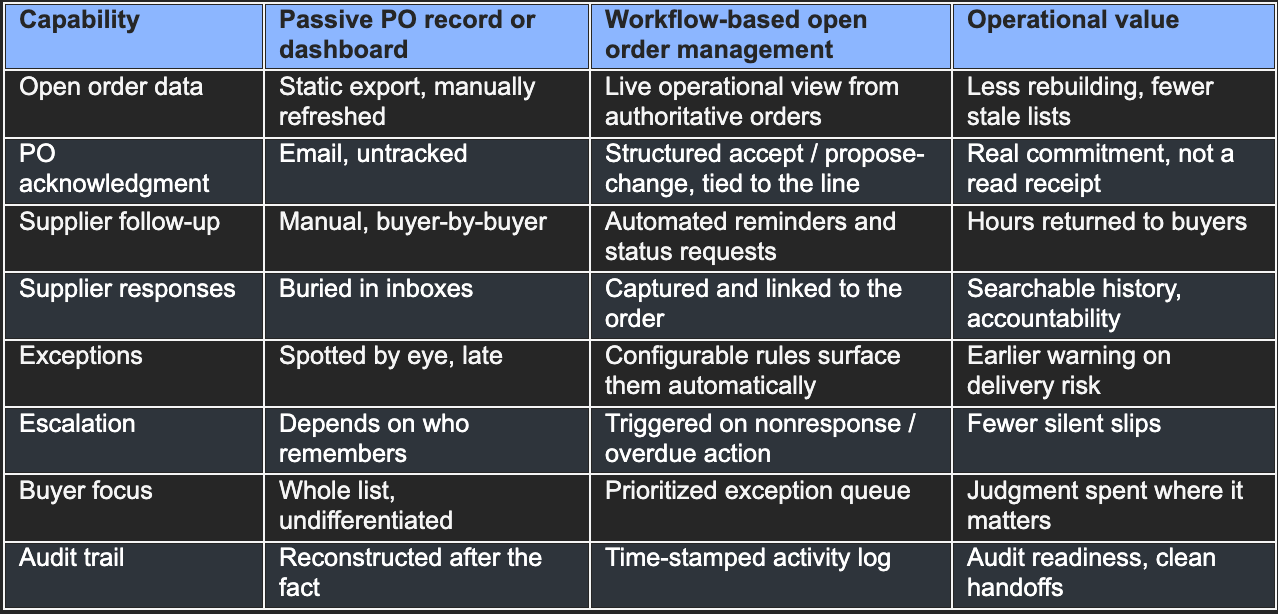
Used well, this category produces compounding outcomes: less manual follow-up, stronger supplier accountability, and earlier warning on delivery risk — the difference between learning about a three-week slip on day 2, when you can still re-source or expedite, and discovering it on day 40 at the receiving dock. Add more current commitments feedingplanning, more consistent process across buyers, and leadership visibility nobody has to hand-build. Fewer preventable surprises is the quiet headline.
Worth being precise about the causal language, because procurement leaders can smell an inflated claim from across the plant. Software cannot prevent every supplier disruption; a flood, a fire, or a sole-source bankruptcy is not going to be fixed by a workflow. What structured open order management can do is give you earlier information, consistent follow-up, structured accountability, and — critically — more time to intervene before a slipped date becomes a stopped line. It creates the conditions for better delivery performance; it does not guarantee it. That distinction is the difference between a tool you trust and a pitch you tune out.
This is the natural place ChainLink SRM fits. ChainLink is a supplier relationship management platform built for procurement teams in complex manufacturing environments, and its open order management software is designed to operate around your ERP as the system of record — structuring the execution layer rather than replacing your records.
In practice, ChainLink ingests your open orders the way that fits your environment — via export or direct integration, depending on the customer’s needs — and brings that information into a live dashboard you can drill down through, from a high-level summary to supplier, buyer, program, part number, PO line, due date, and exception, instead of rebuilding a spreadsheet every time a question comes up. From there, the process runs in a consistent loop: configurable rules detect a condition such as an unacknowledged PO, a milestone date, or an overdue PO line; ChainLink sends the supplier a structured request for a status update, a revised promise date, or a delay explanation; the supplier’s response is captured in the workflow and linked to the order record rather than left in a personal inbox; if the supplier doesn’t respond or an action goes overdue, the system escalates automatically to the right person; and buyers see a prioritized view of the exceptions that need attention — not a full inbox, just what matters. Activity is logged and time-stamped, supporting the audit-ready trail that regulated manufacturers need, and ChainLink’s predictive intelligence is positioned to flag delivery risk and escalate it before a line goes past due.
If you want to see where this sits in the bigger picture, open order execution is one stage of the broader procure-to-pay workflow — the same backbone of required PO acknowledgment, ASNs, and tracked order status requests that runs across the complete procure-to-pay process. The open order stage is simply where a missed signal turns into a missed delivery, which is why it’s worth getting right first.
Open order chaos doesn’t get solved by asking buyers to be more disciplined. Discipline doesn’t scale across hundreds of open POs, dozens of suppliers, and the occasional date that moves while everyone’s looking elsewhere. What scales is connecting PO data to supplier participation and a repeatable operating process — so confirmation, follow-up, escalation, and exception handling happen the same way every time, regardless of who’s covering the portfolio.
That’s the real test of purchase order management software. Creating the PO is table stakes. The best tools keep managing the commitment after the PO is issued — confirming it, updating it, watching it, and putting the right exception in front of the right buyer at the right time.
Learn how ChainLink SRM turns open order chaos into automated procurement execution.
David is the Chief Operations Officer and Director of Business Development at TTP Solutions LLC. Since 2019, David has been the driving force behind sales, marketing, and organizational development. David holds a B.B.A. in Entrepreneurship and a B.A. in Spanish from Middle Tennessee State University. He has a passion for helping others to solve problems creatively. Husband to KerrieAnn, David loves photography, hiking, traveling, and reading.